Translation
Translated from the Spanish source, which is the normative text. Status: draft pending human review. Differences are resolved in the Spanish text.
Layers and rings: separating responsibilities
Current explanatory ASILO 0.1 guide. Names and numbers belong to the declared profile.
A layer groups responsibilities and declares dependencies. In this model, each ring draws a layer; its number grants neither trust nor privilege nor isolation. Where ASILO-R-002 applies —systems with more than one module or package that declare ASILO adoption— the chosen model is declared. Single-module systems record that condition. The requirement specifies no universal count or numbering.
An illustrative model without mandatory numbering
| Part | Responsibility | Analogy |
|---|---|---|
| Core | Pure types and rules without network, file or framework access. | Rules of the work. |
| Contracts or ports | Describe how an interaction is requested. | Shape and measurements of a connection. |
| Adapters | Implement concrete interactions and translate their errors. | A connector for a specific installation. |
| Application or composition | Choose and connect the pieces for a case. | Assembling the installation. |
A profile may separate domain and types, choose other layers or names, and specify checks. The illustrative model does not establish or accept a specific technical profile.
flowchart TD
  accTitle: ASILO: responsibilities and dependencies
  accDescr: The application depends on ports, which are interaction contracts; database, network or interface adapters implement those ports, and ports use types from the core of pure rules and types. A dashed arrow shows that the application wires the adapters during composition.
  A["Application: composes the system"] -->|depends on| P["Ports: interaction contracts"]
  D["Adapters: database, network or interface"] -->|implement| P
  P -->|use types from| N["Core: pure rules and types"]
  A -.->|wires during composition| D
SVG diagram: ASILO: responsibilities and dependencies · Editable Mermaid source.
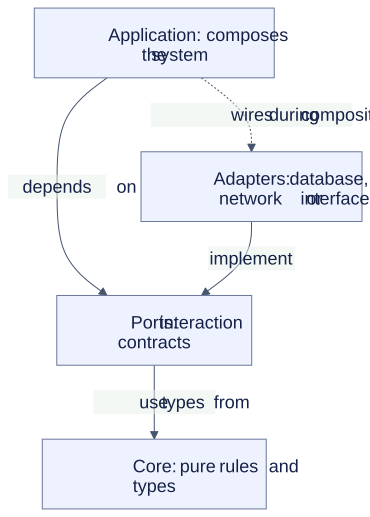
Solid arrows indicate dependencies or contract implementation. The dashed arrow shows the application wiring adapters during composition. Contracts use core types; the core need not know the concrete adapter. This is not a permission or process-isolation diagram.
Checks to keep separate
- Dependencies: a part does not import a prohibited layer.
- Contracts: malformed inputs are rejected with a defined result.
- Authorisation: read permission grants neither writing nor access to another resource.
- Revocation: withdrawn authority is no longer usable.
- Effects: rejection does not perform the prohibited operation.
Tools, environment and evidence belong to the evaluated profile and implementation. Do not present an import check as proof of all the controls above.
Back to layered security · Glossary.
Rings view: a profile’s visual aid
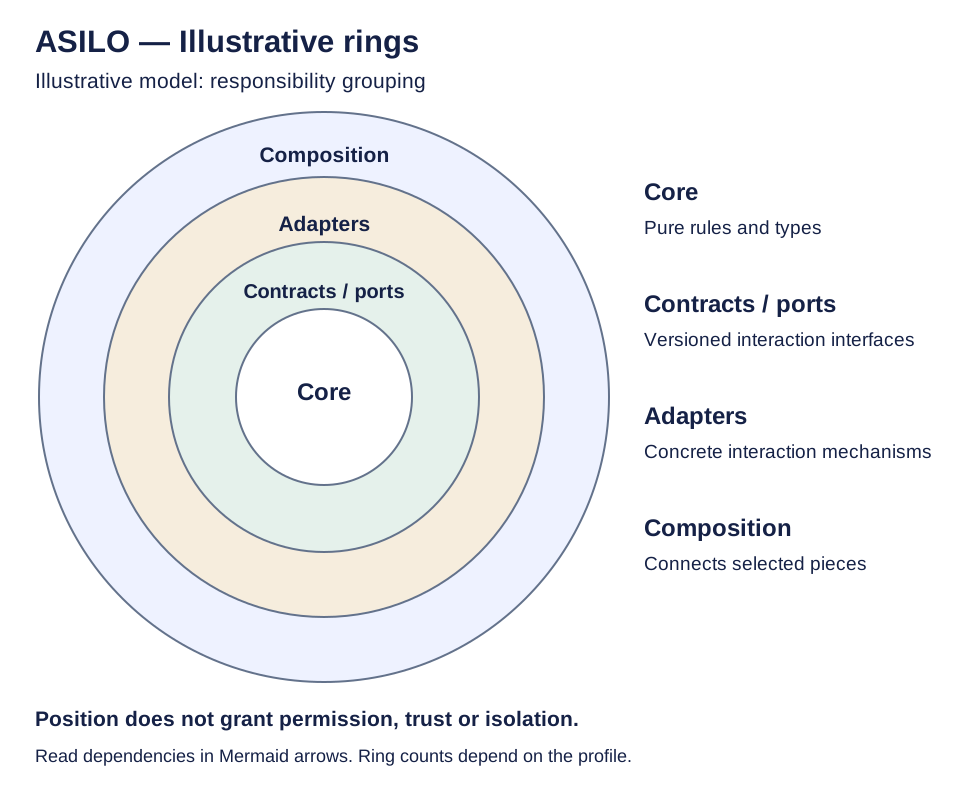
Open the rings SVG. From the centre outwards, the figure shows pure rules and types, interaction contracts, concrete mechanisms and composition. This page’s Mermaid dependency diagram names those layers Core, Ports, Adapters and Application. Circles represent visual grouping; they do not mean that one layer has permission to act on another. Read dependencies from Mermaid arrows, not from distance to the centre.
Relationship with accepted requirements
ASILO-R-002 requires declaring the model and dependency direction when the system has more than one module or package and declares ASILO. Single-module systems record that condition. Rings are one possible illustration in this guide; a profile identifies the chosen model and its checks. No ring count is imposed and ASILO 0.1 is unchanged.
Background and other areas
See where the model comes from to distinguish protection rings, ports and adapters, Onion and Clean Architecture. Analogies across disciplines explain containment, regulation and evidence. Areas and contexts are classifications distinct from the layer count.